LiveSubtitle grows a panel next to the player: the whole transcript laid out line by line, click a line to jump back to that second, original and translation side by side, export when you're done. No subtitles at all? Transcribe one on the spot.
Brave, Vivaldi and other Chromium-based browsers run the same package; Firefox is not supported yet.
Free plan works indefinitely · 5 free AI subtitle jobs + 5 free AI summaries on sign-up · settings and API keys stay on your machine
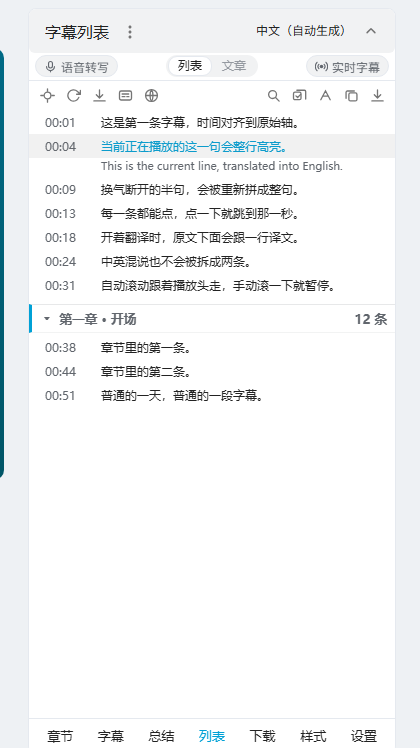
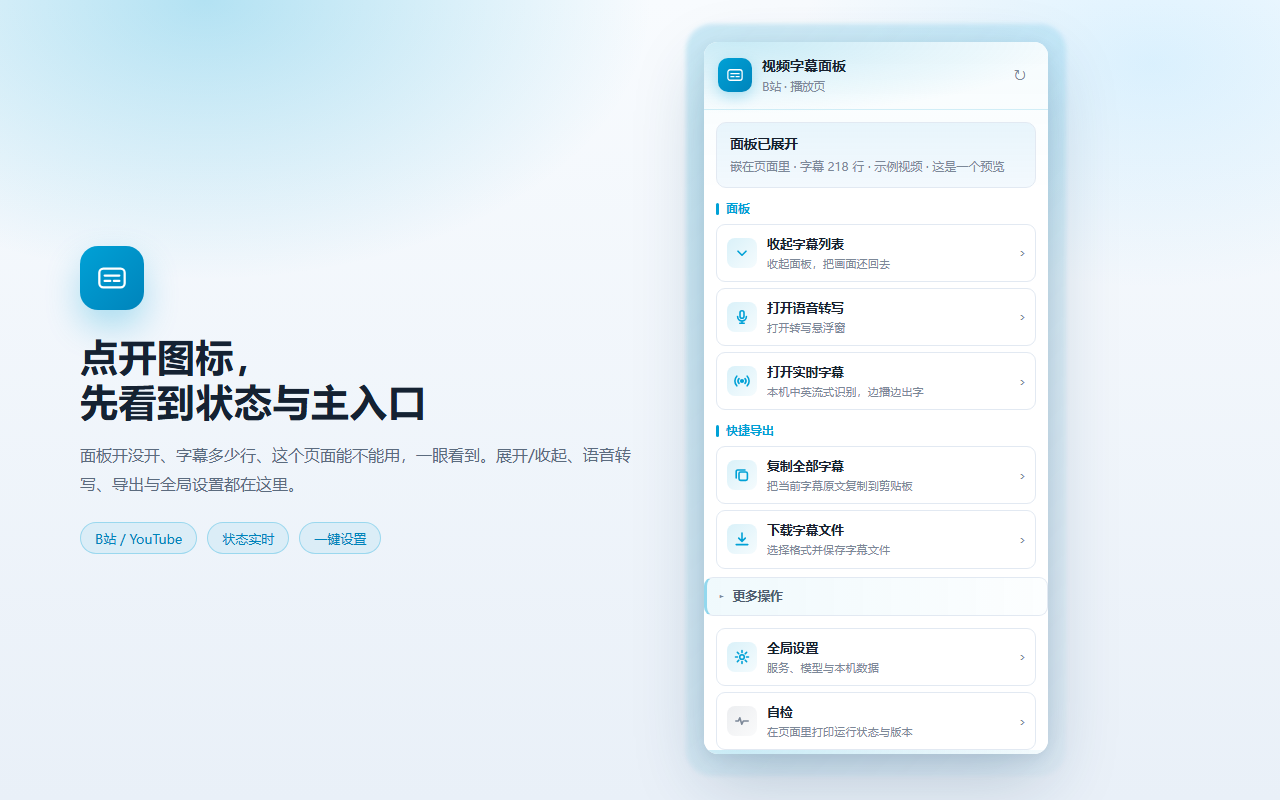
The subtitle panel beside a Bilibili video · line by line · bilingual · chapters folded · highlights follow playback
The fastest way to understand any video — it doesn't change how you watch, it just makes the subtitles stay.
LiveSubtitle is a browser extension. It doesn't take over the player or modify the page — it adds a panel to the video page you're already on. The subtitles that used to flash by get captured as a full transcript: readable line by line, searchable, translatable, exportable. When a video has no subtitle track at all, it can pull the audio and transcribe one on the spot. Everything happens inside your own browser, and your settings, cache and API keys stay on your machine.
The full transcript with timestamps sits in the panel, the current line highlights itself and the list follows along. No more dragging the scrubber to find a sentence — search it and jump straight back.
Original and translation are aligned line by line, not the whole-page machine translation that reads like a different article. Foreign videos flow as easily as ones in your own language.
No subtitles on the video? Generate them on the spot. Don't want to upload audio for transcription? Switch to a model that runs on your own computer.
Read, search, translate, transcribe, export, summarize — one extension covering every move you make with a video's subtitles.
List or article view, timeline highlighting that follows playback, auto-scroll, pinyin search. Scroll to find the line you want, click to jump straight to it.
Read the multilingual CC the video already ships, or switch translation channel: Edge key-free, Google's free endpoint, DeepL, DeepLX, the official Google API, a custom service, or an LLM you already run.
Overlay bilingual subtitles on the video, set font size and colour, drag them where you like and lock them in place — fullscreen included.
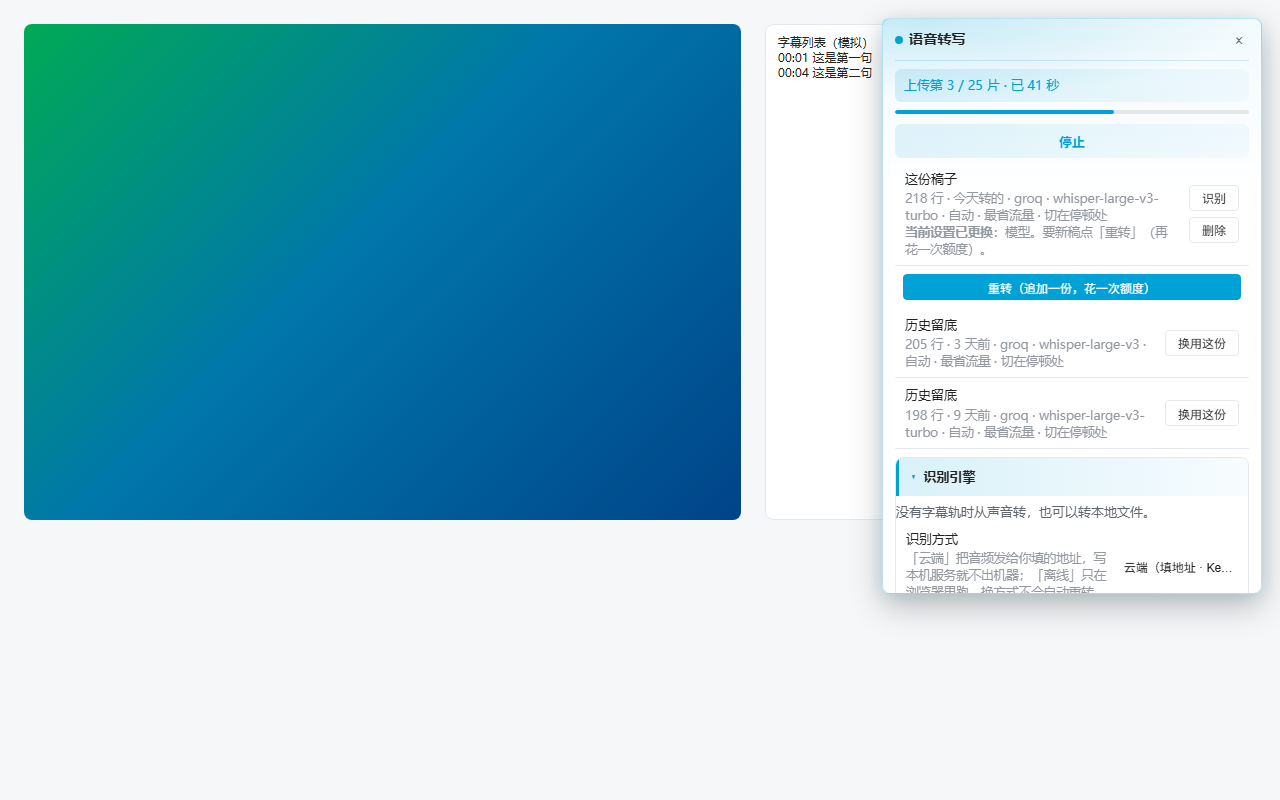
When a video has no subtitle track, or only a raw track you can't follow, the audio is turned into a timestamped transcript. Prefer to stay offline? Run an on-device model instead: SenseVoice, Korean or Japanese. Audio is never written to disk.
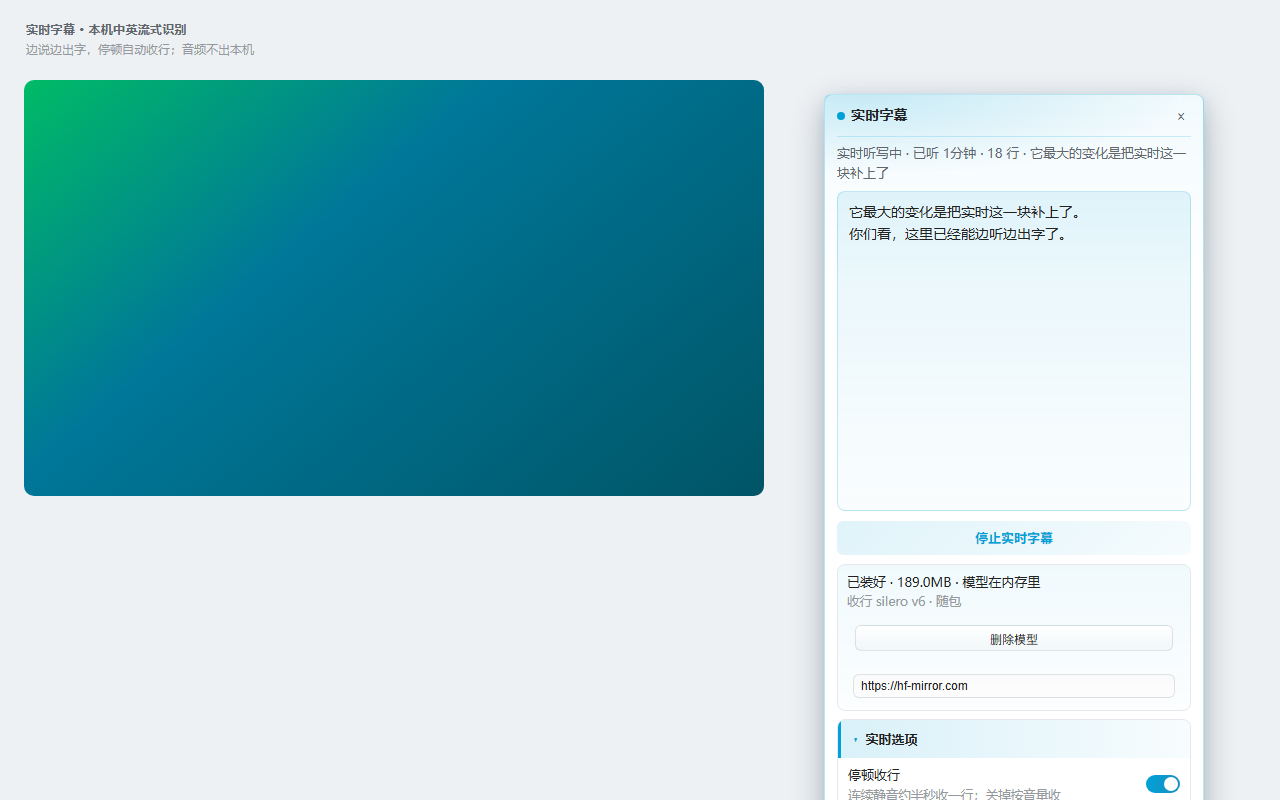
Live streams, raw footage, long videos with no track — captions appear as it plays and lines close automatically at pauses. The 189 MB streaming model downloads on demand and runs only on your machine.
Turns the whole transcript into a sectioned outline with timestamps. Decide whether it's worth watching, then use it as your recap instead of watching again.
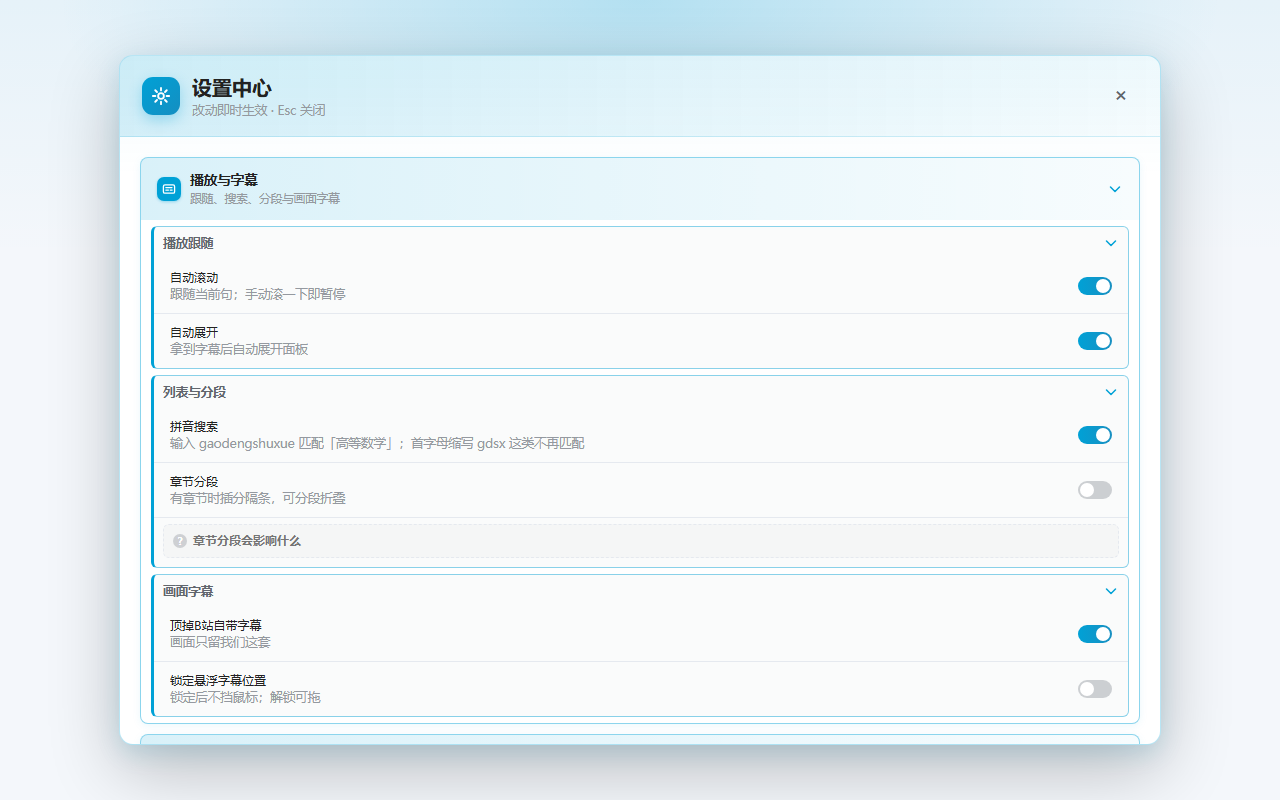
Also included: fold by chapter · export to txt / srt / vtt / ass / lrc / json · a global settings page (translation, AI, transcription models, cache and backups in one place, changes sync to open video tabs instantly)
Every image below is a real screenshot of the extension — no renders, no mockups.
LiveSubtitle is a local-first extension: translation and AI can both point at services you already have. If you'd rather not configure anything, use ours.
For people who already have API keys, or just like tinkering
The trade-off: you get the keys, you fill in the config, you pay for usage.
For people who just want to install it and go
The trade-off: a monthly or yearly subscription — see pricing below.
The free plan works indefinitely and isn't a trial — the panel, translation, transcription, export and live subtitles are all unmetered. Only the three AI features that run on our servers are billed monthly.
| Capability | Free | Pro |
|---|---|---|
| Subtitle panel · read / search / click to seek | Unlimited | Unlimited |
| Fold by chapter · export 6 subtitle formats | Unlimited | Unlimited |
| Floating bilingual subtitles (draggable, lockable) | Unlimited | Unlimited |
| Your browser's own Edge / Google translation | Unlimited | Unlimited |
| On-device transcription (SenseVoice / Korean / Japanese) | Unlimited | Unlimited |
| Live EN/CN subtitles (on-device streaming model) | Unlimited | Unlimited |
| AI line-by-line translation (hosted, zero setup) | — | Unlimited |
| AI subtitles (cloud, no model download) | 5 jobs trial | Unlimited |
| AI summaries | 5 jobs trial | Unlimited |
| How quotas work | One-off, never resets | Resets on the 1st |
One “job” = one video (a single video can carry up to 2 hours of audio). “Unlimited” carries a fair-use ceiling, spelled out in section 6 of the Terms of Service and set 5–10× above normal usage. All usage is measured server-side.
Cancel any time and keep Pro until the period ends. Alipay, WeChat Pay, cards and PayPal accepted.
Install and go — no card, no sign-in
Works out to about $4.92 a month — $37 less than paying monthly
Try it for a month, stop whenever
We're wiring up online payment (Alipay, WeChat Pay, cards and PayPal, processed by Paddle.com as merchant of record). Once it's live, the buttons above go straight into checkout.
You don't have to wait in the meantime: signing up gets you 5 AI subtitle jobs + 5 AI summaries, so you can install the extension and try it right away. To activate Pro early, get a receipt, or ask anything else, email support@livesubtitle.app and we'll reply within 1–2 business days.
Currently Bilibili (bilibili.com) and YouTube, watched in a desktop browser.
“AI subtitles” isn't available on YouTube yet (the platform's limits keep us from reaching the audio), so in practice that feature is Bilibili-first.
The free plan is permanent, not time-limited. The panel, search, chapter folding, export, floating subtitles, live EN/CN subtitles and on-device transcription are all unmetered.
New accounts also get 5 AI subtitle jobs + 5 AI summaries. Those are one-off and don't refill monthly — they're the two most expensive cloud features, so we'd rather you try them by hand before deciding to upgrade.
Because your browser already does it — Edge and Chrome can both translate a page, so there's no reason to make you pay for that.
What Pro adds is line-by-line translation: original and translation aligned line by line, far easier to read than whole-page machine translation and easier to check against the source.
One job = one video. No matter how many chunks it's split into or how many minutes it runs, it counts once.
A single video's audio is capped at 2 hours (longer than any normal video — it's an anti-abuse limit; treat longer videos as two separate jobs).
For normal use, yes — you never have to budget or watch a balance.
To stop scripts from hammering our servers, the Terms of Service carry a fair-use ceiling set 5–10× above normal usage (section 6). Watching videos normally will never come close to it.
Yes. Alipay, WeChat Pay, all major cards, and PayPal for customers outside China.
Payments are processed and receipted by our payment provider Paddle. Your card details never touch our servers.
Click “Manage subscription” in the extension, or use the management link in your receipt email — any time, no need to contact us. Cancelling doesn't cut you off immediately: Pro stays active until the period you paid for ends.
Within 14 days of your first purchase, with AI features essentially unused, you can get a full refund. Full rules in the Refund Policy.
Not on the free plan — subtitle cache, settings and keys all stay on your machine, and on-device transcription doesn't even send audio off your computer.
Pro's cloud AI features need a connection, but send only what's necessary and discard it right after processing:
· Translation and summaries: only the subtitle text and the video title, for that one request.
· AI subtitles: the extension slices the audio locally and uploads those small chunks for transcription — the full video file is never uploaded.
We never use this content to train models and never resell it. See the Privacy Policy.
They do. Jobs follow your account, not your device — sign in on a new machine and keep going.
We'd advise against it. An account's quota is sized for one person; sharing burns through it fast, and unusual sign-ins get restricted.
Email support@livesubtitle.app — we usually reply within 1–2 business days.
The free plan installs and works right away, with unmetered panel and on-device transcription. Sign-up adds 5 AI subtitle jobs + 5 AI summaries.
The extension is in store review. Once it's live, this section becomes the Chrome and Edge install buttons.
Status: in development, not published yet. The store links will appear on this page.
 LiveSubtitle